
air-Q Lab: The Danger of Ultrafine Particulates from Your Printer – We Measured It
Ultrafine particulate matter is man-made and dangerous. These tiny particles penetrate deep into the body and can cause cancer. Laser printers are an often-overlooked source. In a hands-on test, we checked how much particulate matter a printer produces. Read the results here.
What is ultrafine particulate matter: causes & effects
Ultrafine particulate matter has no natural origin — it's man-made and arises, for example, from combustion processes or chemical reactions. Printing and copying also increase the concentration of these tiny particles in the air.
Possible causes of ultrafine particulate matter indoors:
- Exhaust fumes from road and air traffic
- electronic devices such as laser printers
- burning wood & biomass (fireplace, stove, candle soot)
How dangerous is ultrafine particulate matter?
Ultrafine particulate matter refers to the smallest particles, sized under 1 µm. For comparison: a human hair is about 60 µm thick. These tiny particles can stay suspended in the air permanently, meaning they never settle to the ground on their own. Once the particles are airborne, you continuously breathe them in — due to their very small size, the particles then penetrate deep into the respiratory tract. In doing so, they go unnoticed by the immune system's natural cleanup cells, so the ultrafine particles can even pass through the membranes of the alveoli and mucous membranes. Via the alveoli, they enter the bloodstream and, through the blood, reach every organ in the body. They therefore travel much further into the body than larger dust particles, which are often already filtered out and expelled in the nose or lungs. This nanodust has a lasting effect on the cardiovascular system and causes minute inflammation. This can trigger cardiac arrhythmia, lung disease, and strokes; the ongoing inflammation in the body also significantly increases cancer risk. Due to their high lung permeability, ultrafine particles are considered more harmful to health than particulate matter.
Possible health effects from nanoparticles:
- chronic lung disease & respiratory infections
- increased likelihood of tumors in the lungs, brain, and all other organs
- stroke
- heart disease
For more detailed information, see our separate article Health Hazard: Ultrafine Particulate Matter & Nanoparticles.
Particulate matter from laser printers & toner: why does printing produce particulate matter?
First: how does a laser printer work? A laser printer uses a PCR roller to generate static electricity on a rotating image drum or photoconductor drum — the surface becomes electrically charged. The laser beam then discharges certain areas again. Toner powder later adheres to these spots and is fixed with heat. A negative of the printed image forms on the drum. When a laser printer prints one page, two billion particulate matter particles are produced — for every single page.
Professor Dr. med. Helmut Greim, longtime chair of the DFG's MAK Commission, classifies toner as a granular biopersistent dust (GBS) — meaning it cannot be broken down or neutralized by the body's own processes. GBS particles are also poorly soluble and accumulate in the lungs, potentially leading to chronic disease with symptoms such as coughing, impaired lung function, and in more severe cases even destroyed alveoli and emphysema (irreversible overinflation of the alveoli).
What is toner dust made of?
Toner is a powdery mixture of various components. Resin particles (about 90 percent) are primarily what makes the toner stick to the paper. Color pigments account for just five percent. The rest consists of waxes, iron oxide, and various heat-resistant agents.
Toner particles are produced in a melting process that blends and fuses the ingredients together, then mechanically grinds and sieves them. The final toner particle is under 7 µm (micrometers) in size. Potentially toxic compounds can adhere to the surface of toner particles, such as volatile organic compounds (VOCs), ethylbenzene, phenols, aldehydes, or various carboxylic acids.
Studies show that toner dust can contain nano-scale pigments. Although these are embedded in thermoplastic materials, they're released through electrical charging and thus enter the air you breathe. Particle release occurs both during the warm-up phase and while printing.
air-Q Lab: how does air quality change when printing with a laser printer?
We wanted to know how much particulate matter a printer produces. We checked how strongly its operation affects air quality in a hands-on test with our air monitor air-Q.
Our experimental setup and procedure: in our hands-on test, we measured the UTAX P-5030DN laser printer (Kyocera FS-4200DN) with our air-Q Pro. The printer carries the Blue Angel RAL-UZ 171 ecolabel and therefore has a limit on particle count. It was also adequately supplied with toner. We placed both devices in a one-cubic-meter transparent box and sealed it with a lid. Due to the printer cable, we couldn't create a completely airtight space. The test procedure covers both scenarios: room air development with the printer switched on but not printing, and while actively printing. We monitored air development over a 10-minute test run.
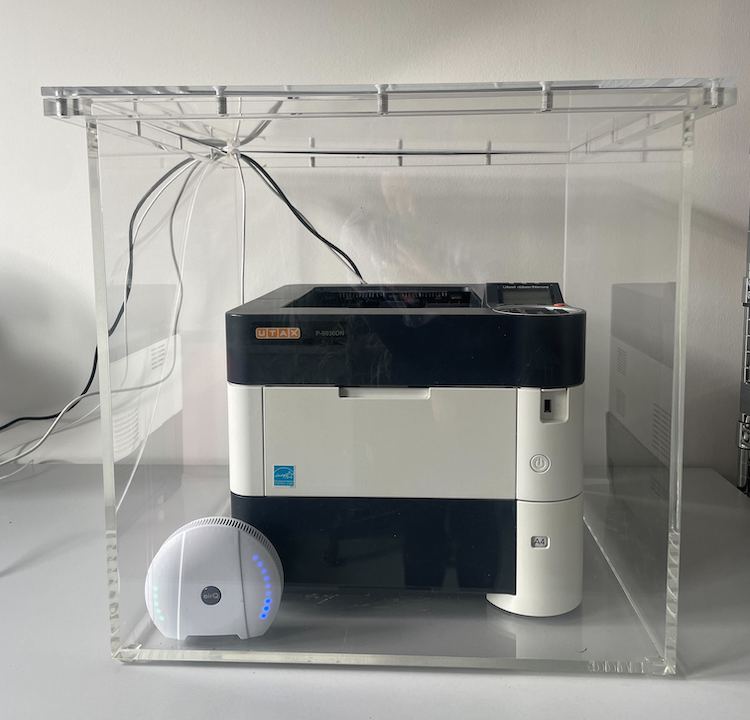
After switching on the device, we let the printer warm up for about three minutes before starting the print job. Pages were then printed for about 9 minutes, with a brief pause to refill paper at around 1:35 p.m. Shortly after, we resumed printing for another minute. After that, the planned test run ended and we concluded the experiment at 1:37 p.m. by switching off the printer.
Our results show that the particulate matter reading rises both while printing and when the print job stops, since the printer cleans itself after operation. We also found that it makes no difference to the reading's development whether only a few pages are printed or the printer runs continuously: particulate matter pollution rises regardless.
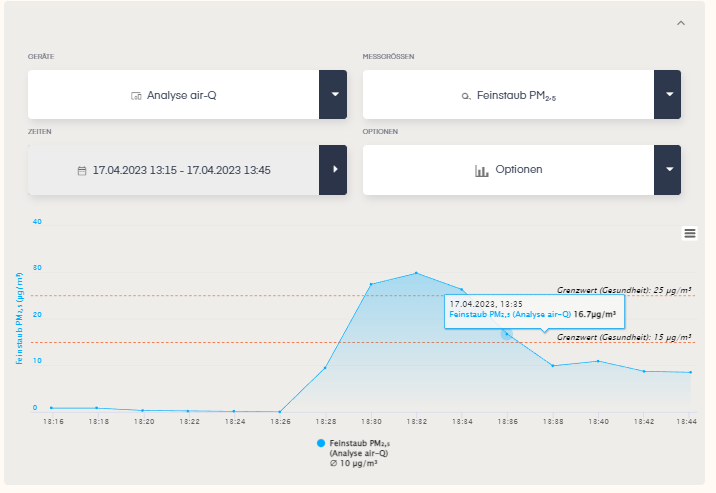
At the start of the test in our air-Q Lab, particulate matter pollution in the box is at 0 µg/m³. After just under two minutes of testing, particulate matter pollution reaches and exceeds the recommended threshold. After seven minutes, the reading hits its peak of about 24 μg/m³ — an exceedance of 166%. After switching off the printer, the values quickly drop again, but only reach the recommended threshold set by the German Federal Environment Agency.
Besides particulate matter, other pollutants also increase, such as VOCs, nitrogen dioxide, and sulfur dioxide.
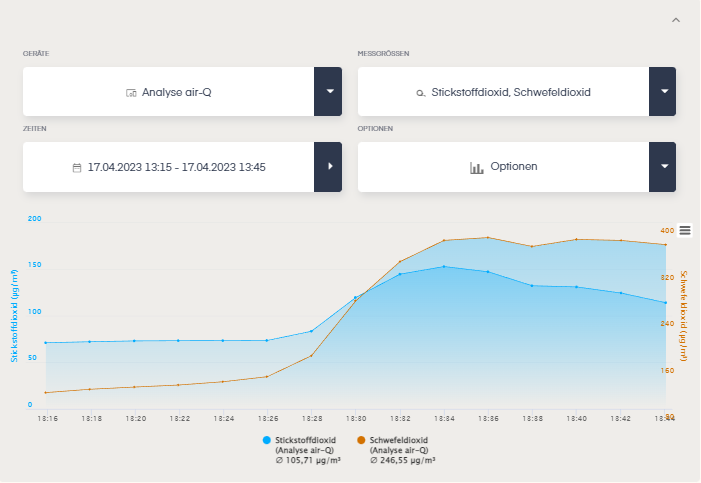
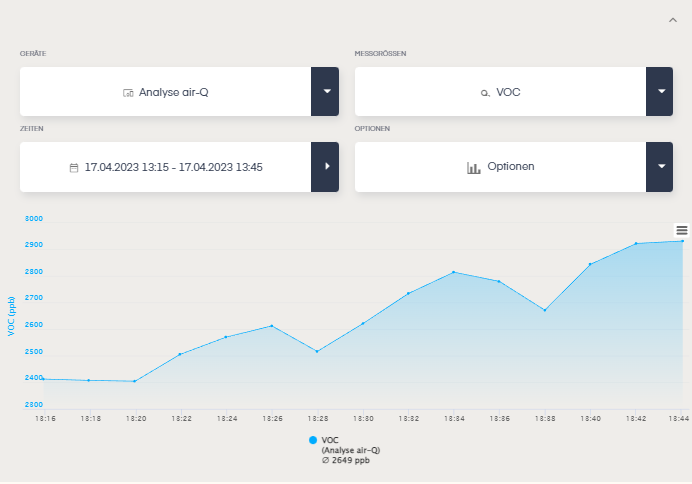
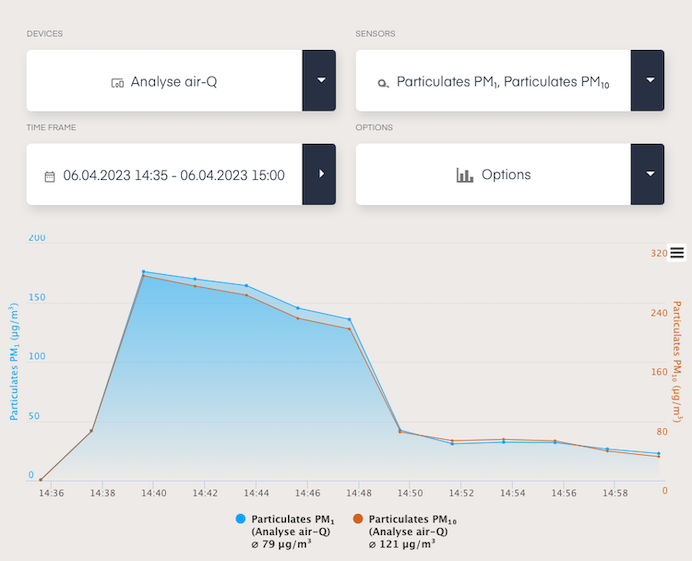
Immediately after switching on and after a longer off period, we also observed an EXTREME spike in particulate matter (see chart below). We're in touch with Kyocera about this, since we can't explain it. Above all, it's extremely harmful to health. We were able to partially reproduce it, though not at this level. Our theory: loose toner was shaken loose during transport or when swapping the toner cartridges and was blown out of the device upon startup.
How do you protect yourself against particulate matter from toner & printers? Our air-Q tips
Isolate laser printers, prefer inkjet printers
Laser printers rely on a chemical-metallic mixture throughout the entire process. While there are modern laser printers that use fewer metals, other pollutants such as VOCs, PAHs, and UFPs are still used in the toner print process or arise during the roughly 200-degree-hot process and enter the air you breathe. Never operate laser printers (toner-based print systems) without a filter, and place laser printers and copiers in separate rooms with independent supply and exhaust air! Make sure these rooms aren't coupled to a central air conditioning system for supply and exhaust air.
Prefer printing with ink instead of toner where possible. Inkjet printing technology is recommended for healthier indoor air. Thanks to so-called heat-free technology, these printers need up to 96% fewer consumables than laser printers. The large ink tanks of inkjet printers are also more sustainable and also prevent the ink from drying out.
Our recommendations for safely operating laser printers/copiers:
- Use certified toner & printers/copiers where possible
- Replace older devices with certified printers where possible, or use lower-emission toner
- Place continuously operating printers in separate rooms
- Regular maintenance & cleaning of devices
- Don't force open print cartridges
Does it help to look for certifications?
Certifications for laser printers include: LGA – tested for pollutants, Energy Star label EPEAT, and BG-Prüfzert / DGUV Test, which tests equipment for safety and health protection. There's also the Blue Angel certification (currently DE-UZ 219) for printers, under which particle emissions are limited to 350 million particles per 10 minutes of printing. However, many devices have apparently been artificially slowed down so they earn certification via an eco mode. It's also not fully clear which emissions are tested when certifying.
Furthermore, the Blue Angel uses a particle-counting method to assess printers. Measurements in μg/m³ are ineffective, though, since ultrafine particles have a measurable, "huge" surface area but negligible weight. As a result, we breathe in billions of particles while the weight threshold is never reached.
Another problem: certification isn't mandatory. So devices that don't achieve the Blue Angel can still be purchased — for example at especially cheap discount prices. There's also no regulation for older devices regarding their service life or a maintenance requirement.
Monitoring air quality & regular ventilation
Test your printer! Use the air-Q air monitor to check how room air develops and how particulate matter forms while printing — at home and in the office. This lets you quickly spot whether your printer is a problem and respond, ventilating as needed to clear out particulate matter and nanoparticles.